
EDLVRS License Correction Online in Nepal 2026: Complete Step-by-Step Guide
If there is an incorrect or outdated detail in your driving license record, you may be able to submit a License Correction Application online through the EDLVRS system instead of immediately visiting the transport office.
In this guide, I will explain the complete process I followed for applying for driving license information correction online, including OTP verification, submitting the correction request, office approval, and an important update regarding the correction fee.
Important: EDLVRS procedures and fees can change. The fee information mentioned below is based on information I received at the transport office during my correction process. Always check the latest information shown on the official EDLVRS portal before making payment.
What Is EDLVRS License Correction?
EDLVRS (Electronic Driving License and Vehicle Registration System) provides online services related to driving licenses and vehicle registration.
If some information in your driving license record needs to be corrected, such as your personal details, you can submit a License Correction Application through your province’s EDLVRS portal.
The general process is:
EDLVRS Website → License Correction Application → Enter Details → OTP Verification → Edit Information → Submit Request → Office Approval → Final Update
How to Apply for Driving License Correction Online
Step 1: Open Your Province’s EDLVRS Website
First, visit the EDLVRS website of your province.
For example, for Madhesh Province, you can access the Electronic Driving License section here:
Madhesh Province EDLVRS – Electronic Driving License
The exact website may be different depending on your province.
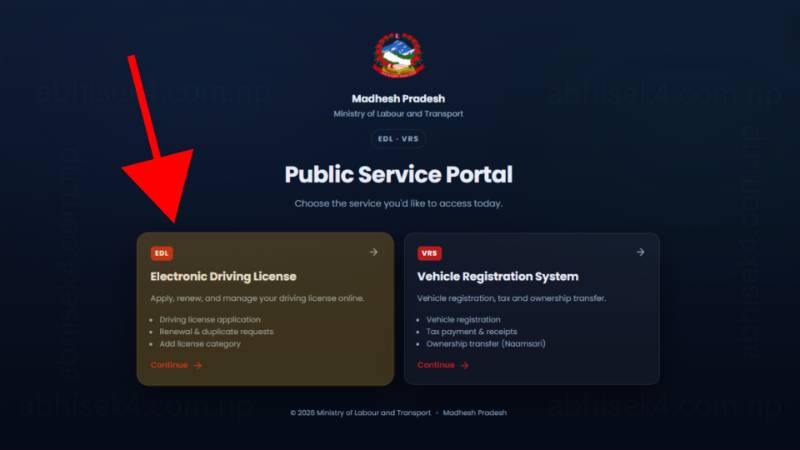
Step 2: Click on “Electronic Driving License”
After opening the EDLVRS website, look for the Electronic Driving License option and click on it.
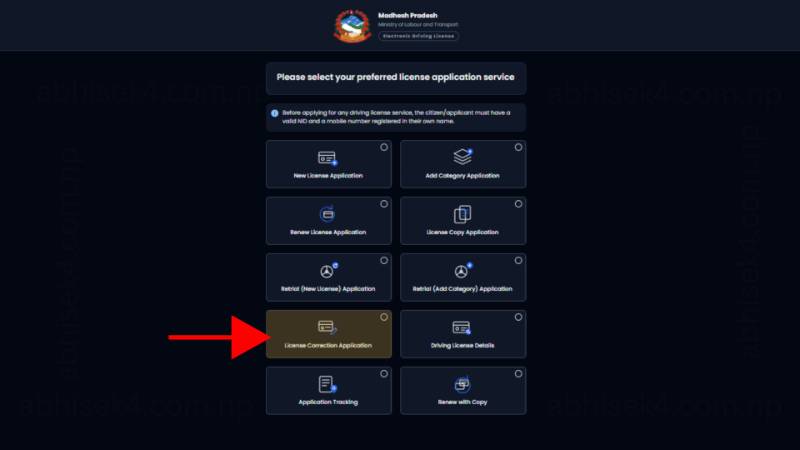
From the available services, select the option for License Correction Application.
Step 3: Fill Out the License Correction Application
You will need to provide your personal and license-related information.
The application may ask for the following details:
- Full Name
- National ID Number
- National ID Image
- License Number
- Date of Birth (AD)
- Gender
- Mobile Number
- Email Address
Make sure the information you enter matches your official documents.
For the National ID Image, upload a clear image as required by the portal.
Step 4: Continue and Verify Your Mobile Number
After entering all the required information, click Continue.
You should then receive an OTP (One-Time Password) on your registered mobile number.
Enter the OTP on the website to verify your request.
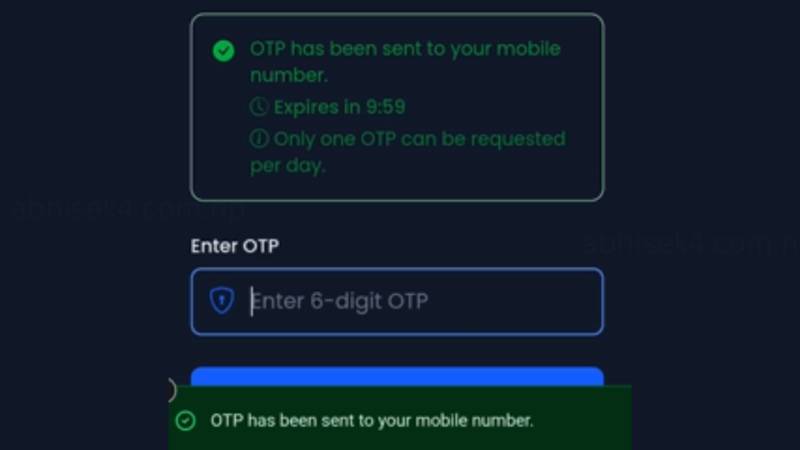
If you do not receive the OTP, check your mobile network and make sure the mobile number you entered is correct.
Step 5: Check Your Existing Details
After successful OTP verification, the system will display your existing information.
Carefully check the details shown on the screen.
Identify the information that you want to correct and edit the relevant fields.
Be Careful Before Updating
Do not change information randomly.
Before submitting the request, compare the information with your National ID and other official documents. Incorrect information submitted through the correction process could cause additional problems or delays.
Step 6: Accept the Declaration
Before submitting the correction request, you will see a confirmation/declaration checkbox.
You need to confirm the declaration that you are updating your own information and that the information contained in your National ID is correct.
The declaration is similar to:
“I confirm that I am updating my own information, myself, and that the details held in my National ID are correct.”
Read the declaration carefully and tick the checkbox if the information is correct.
Step 7: Submit the Update Request
After reviewing everything, click:
Submit Update Request
Once the request is successfully submitted, the system should generate an Application Number.
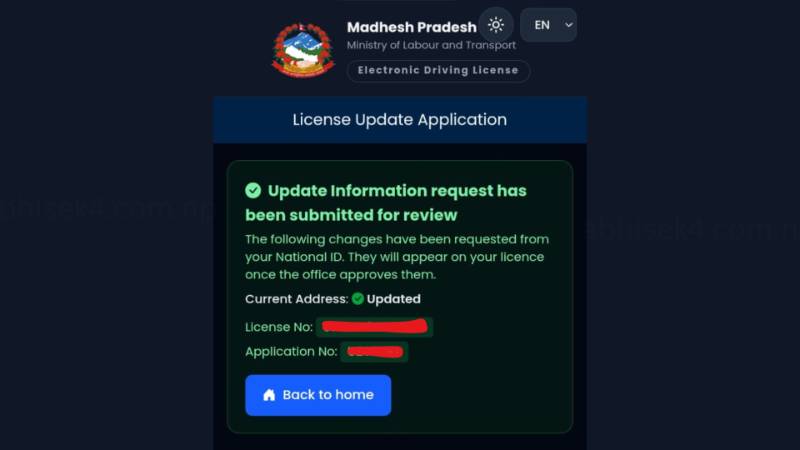
Save Your Application Number
This number is important.
Take a screenshot or write it down somewhere safe because you may need it to track your application or communicate with the transport office.
What Happens After Submitting the Application?
After submission, your application needs to be reviewed and approved by the concerned transport office.
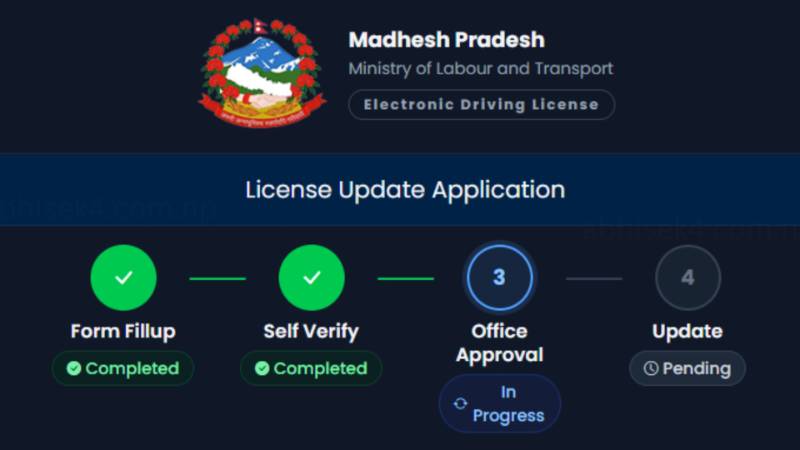
Therefore, submitting the online form does not necessarily mean that your information will be corrected immediately.
You may need to wait for the office to verify and approve your request.
If Your Application Remains Pending
If your application remains unverified for several days, you should contact or visit:
- Your nearest concerned transport office, or
- The office from where you originally obtained your driving license.
Take your relevant documents and Application Number with you.
What You Should Keep Ready
Before starting the correction application, keep these things ready:
- National ID
- Clear National ID image
- Driving license number
- Date of birth
- Mobile number
- Email address
- Correct information you want to update
- Application Number after submission
- Relevant supporting documents, if required
EDLVRS License Correction Process at a Glance
1. Open your province’s EDLVRS website
↓
2. Click Electronic Driving License
↓
3. Select License Correction Application
↓
4. Enter your personal and license details
↓
5. Upload National ID image
↓
6. Click Continue
↓
7. Enter the OTP
↓
8. Check your existing information
↓
9. Edit the information that needs correction
↓
10. Accept the confirmation checkbox
↓
11. Click Submit Update Request
↓
12. Receive your Application Number
↓
13. Wait for transport office approval
↓
14. If the application remains pending, contact/visit the concerned office
↓
15. After approval, complete the remaining update process as instructed by EDLVRS
Frequently Asked Questions
Can I correct my driving license information online?
Yes, EDLVRS provides an online license correction application process through the provincial EDLVRS system. Availability and the exact procedure can depend on the current system and province.
Do I need a National ID for correction?
The online application requires National ID-related information, including the National ID number and an image of the National ID.
Do I receive an OTP?
Yes. After entering the required details and continuing with the application, an OTP is used for verification.
What happens after submitting the correction request?
You receive an Application Number, and the request goes through the concerned office’s verification/approval process.
What if my application stays pending?
If it remains pending for several days, contact or visit your nearest concerned transport office or the office from which your license was issued.
Final Words
The EDLVRS online correction process can save you from filling out the entire correction request manually at the transport office. The important thing is to enter your information carefully, use accurate National ID details, save your Application Number, and monitor the approval status.
If your application remains pending for several days, don’t just keep waiting indefinitely. Contact or visit the concerned transport office and ask about the status of your application.
I will update this article if I receive further verified information about EDLVRS license correction fees, required documents, approval time, or changes to the online correction process.
Disclaimer: This article is based on the EDLVRS process and my personal experience with a license correction application. EDLVRS procedures, fees, requirements, and website interfaces may change. Always verify the latest information from the official EDLVRS portal or the concerned transport office before submitting an application or making a payment.
Last update :- 2026-08-23 3:45 PM / 2083-05-07 3:45 PM